marcel

Jul 282013
 

Today I wanted to install the alexa toolbar on my IE 10 , Windows 7 – 64bit.
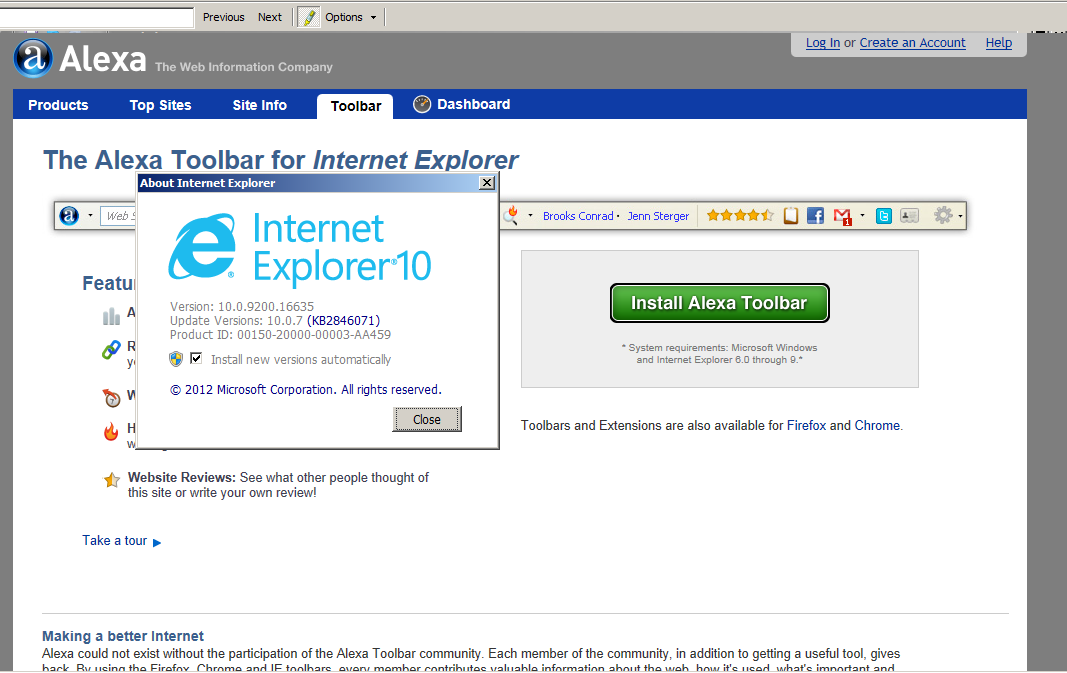
But I get a message which said that my browser is v 10.* and the accepted versions are 6.0 through 9.* >

It is the first time in my life when a plugin complains that my browser is to new 😀

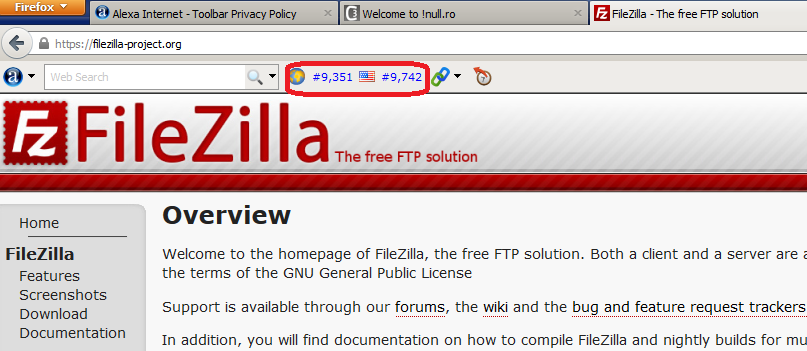
IE 10 to new for alexa.com toolbarThen I’ve installed alexa toolbar on my FireFox browser. Here I have other issue: there is a site https://filezilla-project.org/ reported as #9351 worldwide and as number #9742 in US. My expectation was that WW number to be greater than US one. But probable the people from alexa are counting in a different way 🙂

alexa_and_filezilla

Update January 2014
In the meantime the new version of Alexa toolbar is working on Internet Explorer 6.0 through 11.0.
Even more, now we have a toolbar extension also for Chrome.

What is still missing a toolbar extension for Android browsers.

Jun 252013
 

Few weeks ago I’ve decide that I have to start an experiment: to improve the page rank of my site on alexa.com.
I’ve started this experiment as a result of the SPAM comments that I receive, something like “affordable way to drive tons of traffic to your web page”.
So, I said: Let’s follow the advices and see what’s happen.
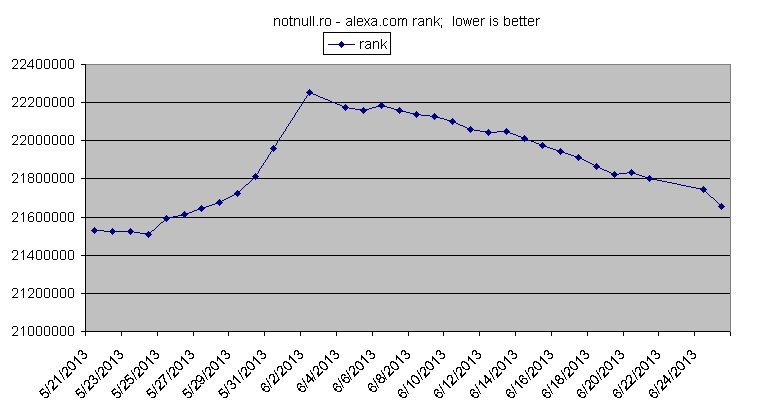
When I’ve started this experiment (21 May 2013) the alexa com rank of my site was around 21530000, there was not too much activity on my site (smaller number is better, mine was a huge one).
So, following the advices I’ve submitted my home page to sites which create mass backlinks, for free. After few days there results were visible: a disaster, my rank stared to decrease.
In a week the position number was increasing like hell.
Searching on the net I’ve noticed that if backlinks on low-quality sites, my page will get a kind of penality.
So, on 30 June 2013 I’ve started to change something:

  • I’ve started to add some good content on my site (this is also what I’m doing right now)
  • Add backlinks to my own site as comments on different blogs, comments manually added (no bots) and they have to really comment what is written on the article
  • Start to create sitemap of my site and submit it to search engines

After two more days, when my page rank starts to improve.
See bellow the graph with the “rise and fall of my rank page” (or better: fall and rise… )

notnull.ro alexa rank

I’ll try on the future to keep track of the page rank, daily if it’s possible, eventually to add on this article some events: “when” I’ve did “what” to improve my position

So, the short story is:

  • mass backlinks generation is a bad thing, it can only hurts
  • write some useful content and share with the others
  • submit your simemap for indexing to search engines
Jun 172013
 

Few days ago a friend asked me for help: after installing some wordpress plugin, the pages refuse to load.
The Internet Explorer browser seems to do some work but the page never success to load.
So, I’ve try to use a different browser: Firefox.
It seems to work in the same way (page never loaded), but in the end I got a message like this: “Firefox has detected that the server is redirecting the request for this address in a way that will never complete.”
Hmm… that seems to be really strange, it seems to be Redirect HTTP response/header but we are nor sure… yet.
So, I’ve remember that there are some good command line tools like “curl” or “wget” that can tell me more about a page.
At that moment I was on a windows machine, and having cygwin environment installed, and fortunately the wget was already installed.
Cygwin is a unix like environment that can be installed on a windows machine.
Install this and you will get almost all the scripting languages available on a unix machine: perl, python, tcl, php, etc.
Now back to wget… running “wget –help” was easy to identify a wget switch/argument “-S”, it says:
-S, --server-response print server response.
So I’ve just used something like “wget -S http://www.example.com/a_page” and I’ve notice the problem: that page is sending back a 301 Redirect to himself, a kind of never eneding loop.
E.g. If it would be my web host, I would have something like

$ wget -S http://www.notnull.ro/log/
--2013-06-17 22:57:15-- http://www.notnull.ro/log/
Resolving www.notnull.ro (www.notnull.ro)... 176.9.70.183
Connecting to www.notnull.ro (www.notnull.ro)|176.9.70.183|:80... connected.
HTTP request sent, awaiting response...
HTTP/1.1 301 Moved Permanently
Date: Mon, 17 Jun 2013 19:59:01 GMT
Server: Apache/2.2.16
Location: http://www.notnull.ro/log/
Vary: Accept-Encoding
Content-Length: 0
Keep-Alive: timeout=15, max=100
Connection: Keep-Alive
Content-Type: text/html; charset=UTF-8
Location: http://www.notnull.ro/log/ [following]
--2013-06-17 22:57:16-- http://www.notnull.ro/log/
Resolving www.notnull.ro (www.notnull.ro)... 176.9.70.183
Reusing existing connection to notnull.ro:80.
HTTP request sent, awaiting response...
HTTP/1.1 301 Moved Permanently
Date: Mon, 17 Jun 2013 19:59:01 GMT
Server: Apache/2.2.16
Location: http://www.notnull.ro/log/
... and so on

As you probable already noticed the page http://www.notnull.ro/log/ is redirecting to http://www.notnull.ro/log/ , which is redirecting to http://www.notnull.ro/log/, which…

You can use the same technique if you play with the Rewrite Rules from Apache webserver. They are really powerful, but also dangerous. You may get in unwanted redirection, and o trace all this you may use the wget to retrieve all the redirection done.

Jun 122013
 

Really handy http://YouTube-mp3.org

It is the easiest online service for converting videos to mp3. You do not need an account, the only thing needed is a YouTube URL.

Sometime you like a song on youtube and you would like to get only the audio part.

It’s easy now: just go to youtube, find the song, copy the url something like http://www.youtube.com/watch?v=tEox1524n9Q , go to http://YouTube-mp3.org, you will notice a form with single input and one button named “Convert Video”. Just paste the url to that form, like below; and submit the form.

http://www.youtube-mp3.org/

http://www.youtube-mp3.org/

That’s all folks,
in few seconds you you get the audio part in mp3 format.

It always works, I do not know how they are doing but the ads are skip from the final mp3 file, just perfect to be used as ringtone :).

 Posted by at 10:30 PM
Jun 072013
 

Firefox has become very slow. It takes too much time to load any page. Google mail page almost impossible to load. Not talking about flash based pages/games ; they never loaded in teh last couple of weeks.
I was trying for days to fix the problem. The only working solution seems to be a reset of your Firefox profile. See here how to do it.
You have to know that doing this you will lose all your Firefox settings and personal information:

  • Cookies
  • Installed Extensions
  • Bookmarks
  • Browse History

But at least when reset profile is done the old profile data are saved in a folder named “Old Firefox Data”, you can later still import some things from there.

It will work for a while, anyhow in the end most likely you will need to reinstall the operating system or to buy a faster/newer CPU. Usually those problems are generated by weak CPU/hardware.

 Posted by at 8:39 PM
Jun 062013
 

I using an windows XP since almost 7 years, never reinstalled.
Everything was fine… OK, maybe it is too slow for now days, but it is runing on a Pentium4 (max speed 3.4 GHz).
So, everything was fine until today, after uninstalling some unused software applications after the reboot I got tens of times messages like

An unhandled win32 exception occurred in mscorsvw.exe [NNNN].
Just-In-Time debugging this exception failed with the following error: No installed debugger has Just-In-Time debugging enabled.
In Visual Studio, Just-In-Time debugging can be enabled from Tools/Options/Debugging/Just-In-Time.

Check the documentation index for 'Just-in-time debugging, error' for more information.

Where NNNN is some random(?!) number.

just in time debugger error

just in time debugger error

After few restarts and googling the only working solution was to delete next two keys from the registry and restart.

  • HKEY_LOCAL_MACHINE\SOFTWARE\Microsoft\.NETFramework\DbgManagedDebugger
  • HKEY_LOCAL_MACHINE\SOFTWARE\Microsoft\Windows NT\CurrentVersion\AeDebug\Debugger

To modify the windows xp registry start a prompt command window (cmd) and type regedit or regedit.exe

Hope that this will help other people.

Jun 032013
 

Since year 2000 I’m a big fun of vim editor, in that period I’ve switched from joe editor to the more powerful vim.

In that period I have used it mostly for PHP programming.
What was not quite OK was the fact that I did not have a PHP help “integrated” into my editor.
What I knew is that the documentation of C/C++ was easy accessible within vim.
In vim when editing C/C++ code just go the the name of a function/structure and press K (SHIFT + k) and magically you will notice the documentation of that word coming up.
The background of this behaviour: when “K” is pressed the vim editor will run the command “man $word” and the output of this command is shown in your editor ($word is the word where the cursor is placed)
The good thing is that the “K” bind key is configurable, all that we have to do is to run set keywordprg=/path/to/my_script in vim (or put it in vim.rc file for needed extensions) and when the “K” key will be press then the vim will run “/path/to/my_script $word”.

The next good thing is that on PHP site if you need the documentation for a function or for a statement is enough to put in your browser an URL like http://www.php.net/$a_word (e.g. http://www.php.net/foreach http://www.php.net/printf ), and php.net will give you the documentation page.

So, for PHP extension I’ve run set keywordprg=/home/mark/my_php_doc and inside /home/mark/my_php_doc I have next couple of lines:

#!/usr/bin/bash
elinks http://www.php.net/$1

It will launch the elinks browser using URL http://www.php.net/$1
Now I have an online PHP help available, always up to date 😉 .

A lot of other things can be done here…
If there is not internet available (hard to believe it nowdays) instead of visiting http://www.php.net/site you can build your own script which will grep some local files and eventually will print the piece of file that you need to stdout (it will be redirected to your editor).
You can also extend the documentation with the function/classes from your own libraries, or for other languages than PHP you can search in the specific directories/files .

This is an old vim tip that I’m using since years, but few days ago talking with some other experienced vim users I’ve noticed that they were not aware of this feature of vim.
So, I felt the need to share it with other people.

Oct 222012
 

Few days ago I had a request to add Facebook Comments Box on a WordPress blog.
Usually this is not a problem, you can find a lot of such plugins on wordpress.org site.
But this request includes an unusual feature: the box comments to be placed under each article, even if there are more articles on the same web page.

I was searching on the net for a plugin with this feature, but not able to find it.

So, I decided that is time to write my 1st wordpress plugin and to integrate facebook social plugin in my site.

Now also on my blog I have this option, you can comment one each single post using your FaceBook account. Just test it, I promise that I’ll not delete the comment 😀

Sep 082012
 

Few time ago I had a tcl chalange that in other languages is straight forward: split a string using as separator a substring.
In tcl there is a split function: [split $myStr $subStr] but, by default it splits by any char of $subStr.
To be more precise let’s assume that we have a string $my_str like

"set1 line1
set1 line 2
set 1 line 3

set2 line 1
set2 line 2

set3 line1
set3 line2
set3 line3"

and we want to split by empty line (“\n\n”).

If we try soemething like
set list_str [split $my_str "\n\n"]
the $list_str is
{set1 line1 } {set1 line 2} {set 1 line 3} {} {set2 line 1} {set2 line 2} {} {set3 line1} {set3 line2} {set3 line3}
it is the same thing as set list_str [split $my_str "\n"] .

The trick is to replace the “\n\n” sequence in $my_str with one single char , a char which does not exists in $my_str, and the to split the result by this single char.
And one char which probable does not exists in $my_str is something like “\x00”.

So, a line like
set list_str [split [string map [list "\n\n" "\x00"] $my_str] "\x00"]
is exactly what you need

Aug 312012
 

Few months ago I’ve bought an Android tablet made by ASUS, together with the docking keyboard.

Until few days ago I didn’t use to much the keyboard, it is useless for browsing and games.

In one weekend I had to go outside of town (no internet) and I still wanted to code some simple PHP pages.

So I was looking for an editor, but looks like it was not easy to find someting convenient on google play store.
I’ve try few editors but non of them was what I wanted.
I was looking for at least two features:

  • fast enough when editing
  • syntax highlighting

Because I’m very comfortable with vim, in the end I just search on google play store for vim Continue reading »

 Posted by at 9:29 PM